> ## Documentation Index
> Fetch the complete documentation index at: https://docs.taap.it/llms.txt
> Use this file to discover all available pages before exploring further.
# How Conversions Work
> Understand the conversion tracking flow from click to conversion
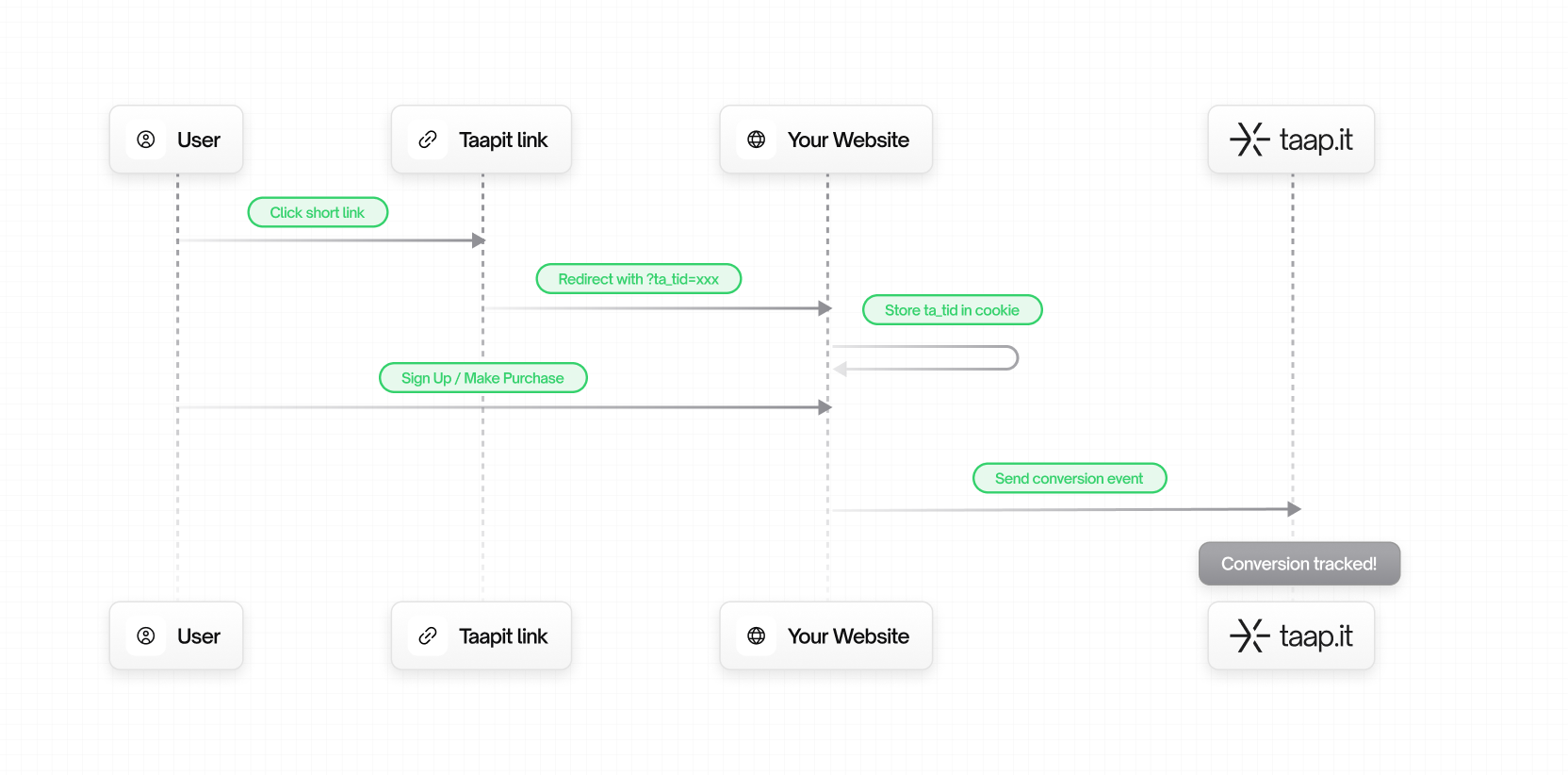
Taapit Conversion Tracking enables you to attribute leads and sales to the deeplinks that drove them. This allows you to measure the true ROI of your marketing campaigns.
## The Conversion Flow
 ## Key Concepts
### 1. Tracking ID (`ta_tid`)
When a user clicks on a Taapit deeplink, we generate a unique tracking ID and append it to your destination URL:
```
https://yoursite.com/landing?ta_tid=rLnWe1uz9t282v7g
```
This ID links the click to any future conversions. It's:
* **Unique per click** – Each click gets its own ID
* **Persistent** – Stored in a cookie
* **Privacy-friendly** – Contains no personal information
Learn more about [the tracking ID](/conversions/tracking-id).
### 2. Lead Events
A **lead** is a potential customer who has shown interest. Examples:
* User signs up for an account
* User submits a contact form
* User starts a free trial
* User subscribes to a newsletter
Lead tracking requires:
* `trackingId` – The `ta_tid` from the cookie
* `customer.externalId` – Your internal user ID
### 3. Sale Events
A **sale** is a completed transaction. Examples:
* One-time purchase
* Subscription payment
* Upgrade to paid plan
* In-app purchase
Sale tracking requires:
* `trackingId` – The `ta_tid` from the cookie
* `customer.externalId` – Your internal user ID
* `amount` – Transaction amount in currency units (e.g., 29.99)
* `currency` – ISO 4217 currency code (e.g., `eur`, `usd`)
### 4. Customer Object
Both lead and sale events include a customer object to identify the user:
```json theme={null}
{
"customer": {
"externalId": "user_123", // Required: Your internal user ID
"email": "john@example.com", // Optional: User's email
"firstname": "John", // Optional: First name
"lastname": "Doe", // Optional: Last name
"phoneNumber": "+33612345678", // Optional: Phone number
"avatarUrl": "https://..." // Optional: Avatar URL
}
}
```
The `externalId` is required and should be your internal user ID. This is used
to deduplicate conversions and track customer lifetime value.
## Attribution Model
Taapit uses **last-click attribution**:
* If a user clicks multiple Taapit links before converting, the conversion is attributed to the **most recent click**
* The cookie window ensures long sales cycles are captured
* Each new click updates the tracking ID
## Conversion Types Comparison
| Feature | Lead | Sale |
| ----------- | ---------------- | ------------------- |
| Tracking ID | Required | Required |
| Customer ID | Required | Required |
| Amount | Not applicable | Required |
| Currency | Not applicable | Required |
| Metadata | Optional | Optional |
| Use case | Sign-ups, trials | Purchases, payments |
## Integration Methods
Choose the integration method that best fits your stack:
### Native Integrations (Zero Code)
| Integration | Best for | Setup time |
| -------------------------------------------- | ------------------- | ---------- |
| [Stripe](/conversions/integrations/stripe) | SaaS, subscriptions | 2 minutes |
| [Shopify](/conversions/integrations/shopify) | E-commerce stores | 2 minutes |
### SDK Integrations
| Method | Best for | Reliability |
| ------------------------------------------------------- | ---------------- | ----------- |
| [Client-side SDK](/conversions/track-leads) | Simple setups | Good |
| [Server-side SDK](/conversions/track-leads#server-side) | Maximum accuracy | Excellent |
### API Integrations
| Method | Best for | Flexibility |
| -------------------------------------- | ------------------- | ----------- |
| [REST API](/conversions/api-reference) | Custom integrations | Maximum |
## Data Flow
### Client-side Flow
```
Browser → Taapit API → Your Dashboard
```
1. Browser reads `ta_tid` from cookie
2. SDK sends event to Taapit API
3. Data appears in your dashboard
**Pros:** Simple setup, no backend changes\
**Cons:** Can be blocked by ad blockers
### Server-side Flow
```
Browser → Your Backend → Taapit API → Your Dashboard
```
1. Browser sends `ta_tid` to your backend (cookie or form field)
2. Your backend sends event to Taapit API
3. Data appears in your dashboard
**Pros:** Cannot be blocked, more reliable\
**Cons:** Requires backend integration
## Privacy & Compliance
Taapit is designed with privacy in mind:
* **No personal data in tracking ID** – `ta_tid` is a random string
* **First-party cookies** – Set on your domain, not blocked by browsers
* **GDPR compliant** – No cross-site tracking
* **Data ownership** – You own your conversion data
## Next Steps
Learn how to retrieve the ta\_tid in your application.
Start tracking lead conversions.
## Key Concepts
### 1. Tracking ID (`ta_tid`)
When a user clicks on a Taapit deeplink, we generate a unique tracking ID and append it to your destination URL:
```
https://yoursite.com/landing?ta_tid=rLnWe1uz9t282v7g
```
This ID links the click to any future conversions. It's:
* **Unique per click** – Each click gets its own ID
* **Persistent** – Stored in a cookie
* **Privacy-friendly** – Contains no personal information
Learn more about [the tracking ID](/conversions/tracking-id).
### 2. Lead Events
A **lead** is a potential customer who has shown interest. Examples:
* User signs up for an account
* User submits a contact form
* User starts a free trial
* User subscribes to a newsletter
Lead tracking requires:
* `trackingId` – The `ta_tid` from the cookie
* `customer.externalId` – Your internal user ID
### 3. Sale Events
A **sale** is a completed transaction. Examples:
* One-time purchase
* Subscription payment
* Upgrade to paid plan
* In-app purchase
Sale tracking requires:
* `trackingId` – The `ta_tid` from the cookie
* `customer.externalId` – Your internal user ID
* `amount` – Transaction amount in currency units (e.g., 29.99)
* `currency` – ISO 4217 currency code (e.g., `eur`, `usd`)
### 4. Customer Object
Both lead and sale events include a customer object to identify the user:
```json theme={null}
{
"customer": {
"externalId": "user_123", // Required: Your internal user ID
"email": "john@example.com", // Optional: User's email
"firstname": "John", // Optional: First name
"lastname": "Doe", // Optional: Last name
"phoneNumber": "+33612345678", // Optional: Phone number
"avatarUrl": "https://..." // Optional: Avatar URL
}
}
```
The `externalId` is required and should be your internal user ID. This is used
to deduplicate conversions and track customer lifetime value.
## Attribution Model
Taapit uses **last-click attribution**:
* If a user clicks multiple Taapit links before converting, the conversion is attributed to the **most recent click**
* The cookie window ensures long sales cycles are captured
* Each new click updates the tracking ID
## Conversion Types Comparison
| Feature | Lead | Sale |
| ----------- | ---------------- | ------------------- |
| Tracking ID | Required | Required |
| Customer ID | Required | Required |
| Amount | Not applicable | Required |
| Currency | Not applicable | Required |
| Metadata | Optional | Optional |
| Use case | Sign-ups, trials | Purchases, payments |
## Integration Methods
Choose the integration method that best fits your stack:
### Native Integrations (Zero Code)
| Integration | Best for | Setup time |
| -------------------------------------------- | ------------------- | ---------- |
| [Stripe](/conversions/integrations/stripe) | SaaS, subscriptions | 2 minutes |
| [Shopify](/conversions/integrations/shopify) | E-commerce stores | 2 minutes |
### SDK Integrations
| Method | Best for | Reliability |
| ------------------------------------------------------- | ---------------- | ----------- |
| [Client-side SDK](/conversions/track-leads) | Simple setups | Good |
| [Server-side SDK](/conversions/track-leads#server-side) | Maximum accuracy | Excellent |
### API Integrations
| Method | Best for | Flexibility |
| -------------------------------------- | ------------------- | ----------- |
| [REST API](/conversions/api-reference) | Custom integrations | Maximum |
## Data Flow
### Client-side Flow
```
Browser → Taapit API → Your Dashboard
```
1. Browser reads `ta_tid` from cookie
2. SDK sends event to Taapit API
3. Data appears in your dashboard
**Pros:** Simple setup, no backend changes\
**Cons:** Can be blocked by ad blockers
### Server-side Flow
```
Browser → Your Backend → Taapit API → Your Dashboard
```
1. Browser sends `ta_tid` to your backend (cookie or form field)
2. Your backend sends event to Taapit API
3. Data appears in your dashboard
**Pros:** Cannot be blocked, more reliable\
**Cons:** Requires backend integration
## Privacy & Compliance
Taapit is designed with privacy in mind:
* **No personal data in tracking ID** – `ta_tid` is a random string
* **First-party cookies** – Set on your domain, not blocked by browsers
* **GDPR compliant** – No cross-site tracking
* **Data ownership** – You own your conversion data
## Next Steps
Learn how to retrieve the ta\_tid in your application.
Start tracking lead conversions.