> ## Documentation Index
> Fetch the complete documentation index at: https://docs.taap.it/llms.txt
> Use this file to discover all available pages before exploring further.
# Server-side Integration (Recommended)
> Track conversions from your backend for maximum reliability
import { Steps, Step } from "fumadocs-ui/components/steps";
Server-side tracking is the **recommended method** for conversion tracking because it:
* ✅ **Can't be blocked** by ad blockers
* ✅ **Guarantees delivery** of tracking events
* ✅ **Confirms actions** before tracking (e.g., payment verified)
* ✅ **Works with webhooks** from payment providers
## How It Works
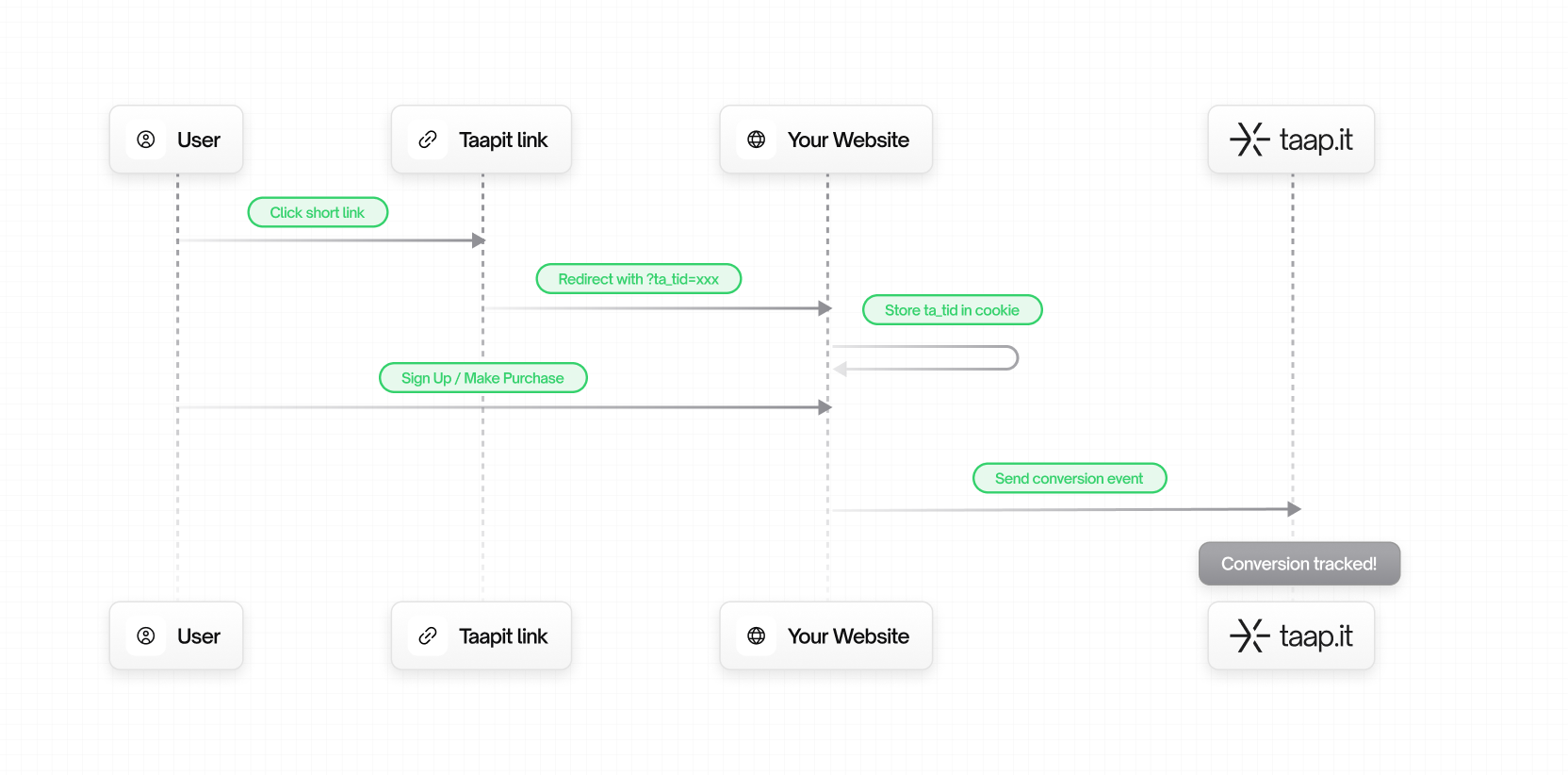 ## Prerequisites
**Important**: For conversion tracking to work, users must arrive on your
website via a **Taapit deeplink**. This is how the tracking ID (`ta_tid`) is
generated and passed to your site.
Before you start:
1. **Create a Taapit deeplink** pointing to your website or landing page
2. **Enable conversion tracking** on your link:
* Go to your link settings in the Taapit dashboard
* Enable **Conversion Tracking**
3. **Get your Secret Key** from [Settings → Conversion](https://taap.it/dashboard/settings/conversion) in your Taapit dashboard
Never expose your **secret key** in client-side code. Use it only on your
server.
## Installation
Even for server-side tracking, you **must** install the SDK on your frontend
to capture the `ta_tid` cookie.
### Step 1: Frontend - Install the SDK
```bash theme={null}
npm install taapit-sdk
```
Add the Analytics component to capture `ta_tid`:
```tsx app/layout.tsx theme={null}
import { Analytics } from "taapit-sdk/react";
export default function RootLayout({ children }) {
return (
{children}
);
}
```
### Step 2: Backend - Set up your API key
```bash .env theme={null}
TAAPIT_API_KEY=taapit_sk_xxx
```
Never expose your secret API key in client-side code.
### Step 3: Backend - Track conversions
```typescript app/api/signup/route.ts theme={null}
import { Taapit } from "taapit-sdk";
import { cookies } from "next/headers";
const taapit = new Taapit({
apiKey: process.env.TAAPIT_API_KEY,
});
export async function POST(request: Request) {
const body = await request.json();
// Get tracking ID from cookie
const cookieStore = cookies();
const trackingId = cookieStore.get("ta_tid")?.value;
// Create user in your database
const user = await db.users.create({
email: body.email,
name: body.name,
});
// Track the lead
if (trackingId) {
await taapit.track.lead({
trackingId,
customer: {
externalId: user.id,
email: user.email,
},
});
}
return Response.json({ user });
}
```
### Step 1: Frontend - Add the script
```html theme={null}
```
### Step 2: Frontend - Send tracking ID to backend
```html theme={null}
```
### Step 3: Backend - Call the REST API
```bash theme={null}
curl -X POST https://track.taap.it/api/events/lead \
-H "Authorization: Bearer taapit_sk_xxx" \
-H "Content-Type: application/json" \
-d '{
"trackingId": "rLnWe1uz9t282v7g",
"customer": {
"externalId": "user_123",
"email": "john@example.com"
}
}'
```
## Track a Lead
```typescript theme={null}
import { Taapit } from 'taapit-sdk';
import { cookies } from 'next/headers';
const taapit = new Taapit({ apiKey: process.env.TAAPIT_API_KEY });
export async function POST(request: Request) {
const body = await request.json();
const cookieStore = cookies();
const trackingId = cookieStore.get('ta_tid')?.value || body.trackingId;
// Create user
const user = await createUser(body);
// Track lead
if (trackingId) {
const result = await taapit.track.lead({
trackingId,
customer: {
externalId: user.id,
email: user.email,
firstname: body.firstName,
lastname: body.lastName,
},
metadata: {
source: 'signup-api',
plan: body.plan,
},
});
if (!result.success) {
console.error('Failed to track lead:', result.error);
}
}
return Response.json({ user });
}
```
```python theme={null}
import requests
def track_lead(tracking_id: str, user: dict):
response = requests.post(
'https://track.taap.it/api/events/lead',
headers={
'Authorization': f'Bearer {TAAPIT_API_KEY}',
'Content-Type': 'application/json',
},
json={
'trackingId': tracking_id,
'customer': {
'externalId': user['id'],
'email': user['email'],
'firstname': user.get('first_name'),
'lastname': user.get('last_name'),
},
},
)
return response.json()
```
```php theme={null}
true,
CURLOPT_POST => true,
CURLOPT_HTTPHEADER => [
'Authorization: Bearer ' . TAAPIT_API_KEY,
'Content-Type: application/json',
],
CURLOPT_POSTFIELDS => json_encode([
'trackingId' => $trackingId,
'customer' => [
'externalId' => $user['id'],
'email' => $user['email'],
],
]),
]);
$response = curl_exec($ch);
return json_decode($response, true);
}
```
```ruby theme={null}
require 'net/http'
require 'json'
def track_lead(tracking_id, user)
uri = URI('https://track.taap.it/api/events/lead')
http = Net::HTTP.new(uri.host, uri.port)
http.use_ssl = true
request = Net::HTTP::Post.new(uri.path)
request['Authorization'] = "Bearer #{TAAPIT_API_KEY}"
request['Content-Type'] = 'application/json'
request.body = {
trackingId: tracking_id,
customer: {
externalId: user[:id],
email: user[:email]
}
}.to_json
response = http.request(request)
JSON.parse(response.body)
end
```
```go theme={null}
func trackLead(trackingID string, user User) error {
payload := map[string]interface{}{
"trackingId": trackingID,
"customer": map[string]string{
"externalId": user.ID,
"email": user.Email,
},
}
body, _ := json.Marshal(payload)
req, _ := http.NewRequest("POST",
"https://track.taap.it/api/events/lead",
bytes.NewBuffer(body))
req.Header.Set("Authorization", "Bearer "+apiKey)
req.Header.Set("Content-Type", "application/json")
client := &http.Client{}
resp, err := client.Do(req)
if err != nil {
return err
}
defer resp.Body.Close()
return nil
}
```
## Track a Sale
**`trackingId` for sales**: If the customer was already tracked via a **lead
event**, the `trackingId` is optional for sale events. You only need to
provide the `customerExternalId` to link the sale to the existing customer. If
this is a **new customer** (no prior lead), `trackingId` is required.
```typescript theme={null}
export async function POST(request: Request) {
const body = await request.json();
const cookieStore = cookies();
const trackingId = cookieStore.get('ta_tid')?.value || body.trackingId;
// Verify payment
const order = await verifyPayment(body);
// Track sale
// trackingId is optional if customer was already tracked via a lead event
await taapit.track.sale({
trackingId, // Optional if customer already exists
customer: {
externalId: order.userId, // Required - links to existing customer or creates new one
email: order.customerEmail,
},
amount: order.total, // e.g., 149.99 (NOT cents)
currency: order.currency, // e.g., 'eur'
metadata: {
orderId: order.id,
productIds: order.items.map(i => i.productId),
},
});
return Response.json({ success: true });
}
```
```bash theme={null}
# With trackingId (new customer or first-time tracking)
curl -X POST https://track.taap.it/api/events/sale \
-H "Authorization: Bearer taapit_sk_xxx" \
-H "Content-Type: application/json" \
-d '{
"trackingId": "rLnWe1uz9t282v7g",
"customer": {
"externalId": "user_123",
"email": "john@example.com"
},
"amount": 99.99,
"currency": "eur",
"metadata": {
"orderId": "order_456"
}
}'
# Without trackingId (customer already tracked via lead event)
curl -X POST https://track.taap.it/api/events/sale \
-H "Authorization: Bearer taapit_sk_xxx" \
-H "Content-Type: application/json" \
-d '{
"customer": {
"externalId": "user_123"
},
"amount": 99.99,
"currency": "eur"
}'
```
The `amount` must be in **currency units**, not cents.
* ✅ `amount: 29.99` for €29.99
* ❌ `amount: 2999` (this would be €2999)
## API Reference
### Endpoints
| Event | Endpoint |
| ----- | -------------------------------------------- |
| Lead | `POST https://track.taap.it/api/events/lead` |
| Sale | `POST https://track.taap.it/api/events/sale` |
### Authentication
```
Authorization: Bearer taapit_sk_xxx
```
### Request Body
```json theme={null}
{
"trackingId": "rLnWe1uz9t282v7g",
"customer": {
"externalId": "user_123",
"email": "john@example.com",
"firstname": "John",
"lastname": "Doe",
"phoneNumber": "+33612345678",
"avatarUrl": "https://example.com/avatar.jpg"
},
"amount": 99.99, // Sale only
"currency": "eur", // Sale only
"metadata": {}
}
```
| Field | Type | Required | Description |
| --------------------- | ------ | --------- | ---------------------------- |
| `trackingId` | string | See below | The `ta_tid` from cookie/URL |
| `customer.externalId` | string | Yes | Your internal user ID |
| `customer.email` | string | No | User's email |
| `amount` | number | Sale only | Amount in currency units |
| `currency` | string | Sale only | ISO 4217 code (eur, usd...) |
| `metadata` | object | No | Custom data |
**When is `trackingId` required?** - **Lead events**: `trackingId` is **always
required** - **Sale events**: - If the `customerExternalId` was already
tracked (via a previous lead event), `trackingId` is **optional** - If this is
a new customer (no prior lead event), `trackingId` is **required** to create
the customer record
### Response
```json theme={null}
{ "ok": true }
```
## Best Practices
### 1. Get tracking ID from multiple sources
```typescript theme={null}
const cookieStore = cookies();
const trackingId =
cookieStore.get("ta_tid")?.value || // Cookie (preferred)
body.trackingId || // Request body
new URL(request.url).searchParams.get("ta_tid"); // URL param
```
### 2. Always track after confirmation
```typescript theme={null}
// ✅ Good - Track after payment is confirmed
const paymentResult = await processPayment();
if (paymentResult.success) {
await taapit.track.sale({...});
}
// ❌ Bad - Track before confirmation
await taapit.track.sale({...});
const paymentResult = await processPayment(); // Might fail!
```
### 3. Store tracking ID for later use
```typescript theme={null}
// When creating checkout session
const session = await stripe.checkout.sessions.create({
metadata: { ta_tid: trackingId }, // Store for webhook
});
// Later in webhook, retrieve it
const trackingId = session.metadata.ta_tid;
```
### 4. Log tracking failures
```typescript theme={null}
const result = await taapit.track.sale({...});
if (!result.success) {
console.error('Taapit tracking failed:', result.error);
// Don't fail the main operation - tracking is secondary
}
```
## Next Steps
Automatic tracking for Stripe (even simpler).
Full API documentation for leads.
Full API documentation for sales.
## Prerequisites
**Important**: For conversion tracking to work, users must arrive on your
website via a **Taapit deeplink**. This is how the tracking ID (`ta_tid`) is
generated and passed to your site.
Before you start:
1. **Create a Taapit deeplink** pointing to your website or landing page
2. **Enable conversion tracking** on your link:
* Go to your link settings in the Taapit dashboard
* Enable **Conversion Tracking**
3. **Get your Secret Key** from [Settings → Conversion](https://taap.it/dashboard/settings/conversion) in your Taapit dashboard
Never expose your **secret key** in client-side code. Use it only on your
server.
## Installation
Even for server-side tracking, you **must** install the SDK on your frontend
to capture the `ta_tid` cookie.
### Step 1: Frontend - Install the SDK
```bash theme={null}
npm install taapit-sdk
```
Add the Analytics component to capture `ta_tid`:
```tsx app/layout.tsx theme={null}
import { Analytics } from "taapit-sdk/react";
export default function RootLayout({ children }) {
return (
{children}
);
}
```
### Step 2: Backend - Set up your API key
```bash .env theme={null}
TAAPIT_API_KEY=taapit_sk_xxx
```
Never expose your secret API key in client-side code.
### Step 3: Backend - Track conversions
```typescript app/api/signup/route.ts theme={null}
import { Taapit } from "taapit-sdk";
import { cookies } from "next/headers";
const taapit = new Taapit({
apiKey: process.env.TAAPIT_API_KEY,
});
export async function POST(request: Request) {
const body = await request.json();
// Get tracking ID from cookie
const cookieStore = cookies();
const trackingId = cookieStore.get("ta_tid")?.value;
// Create user in your database
const user = await db.users.create({
email: body.email,
name: body.name,
});
// Track the lead
if (trackingId) {
await taapit.track.lead({
trackingId,
customer: {
externalId: user.id,
email: user.email,
},
});
}
return Response.json({ user });
}
```
### Step 1: Frontend - Add the script
```html theme={null}
```
### Step 2: Frontend - Send tracking ID to backend
```html theme={null}
```
### Step 3: Backend - Call the REST API
```bash theme={null}
curl -X POST https://track.taap.it/api/events/lead \
-H "Authorization: Bearer taapit_sk_xxx" \
-H "Content-Type: application/json" \
-d '{
"trackingId": "rLnWe1uz9t282v7g",
"customer": {
"externalId": "user_123",
"email": "john@example.com"
}
}'
```
## Track a Lead
```typescript theme={null}
import { Taapit } from 'taapit-sdk';
import { cookies } from 'next/headers';
const taapit = new Taapit({ apiKey: process.env.TAAPIT_API_KEY });
export async function POST(request: Request) {
const body = await request.json();
const cookieStore = cookies();
const trackingId = cookieStore.get('ta_tid')?.value || body.trackingId;
// Create user
const user = await createUser(body);
// Track lead
if (trackingId) {
const result = await taapit.track.lead({
trackingId,
customer: {
externalId: user.id,
email: user.email,
firstname: body.firstName,
lastname: body.lastName,
},
metadata: {
source: 'signup-api',
plan: body.plan,
},
});
if (!result.success) {
console.error('Failed to track lead:', result.error);
}
}
return Response.json({ user });
}
```
```python theme={null}
import requests
def track_lead(tracking_id: str, user: dict):
response = requests.post(
'https://track.taap.it/api/events/lead',
headers={
'Authorization': f'Bearer {TAAPIT_API_KEY}',
'Content-Type': 'application/json',
},
json={
'trackingId': tracking_id,
'customer': {
'externalId': user['id'],
'email': user['email'],
'firstname': user.get('first_name'),
'lastname': user.get('last_name'),
},
},
)
return response.json()
```
```php theme={null}
true,
CURLOPT_POST => true,
CURLOPT_HTTPHEADER => [
'Authorization: Bearer ' . TAAPIT_API_KEY,
'Content-Type: application/json',
],
CURLOPT_POSTFIELDS => json_encode([
'trackingId' => $trackingId,
'customer' => [
'externalId' => $user['id'],
'email' => $user['email'],
],
]),
]);
$response = curl_exec($ch);
return json_decode($response, true);
}
```
```ruby theme={null}
require 'net/http'
require 'json'
def track_lead(tracking_id, user)
uri = URI('https://track.taap.it/api/events/lead')
http = Net::HTTP.new(uri.host, uri.port)
http.use_ssl = true
request = Net::HTTP::Post.new(uri.path)
request['Authorization'] = "Bearer #{TAAPIT_API_KEY}"
request['Content-Type'] = 'application/json'
request.body = {
trackingId: tracking_id,
customer: {
externalId: user[:id],
email: user[:email]
}
}.to_json
response = http.request(request)
JSON.parse(response.body)
end
```
```go theme={null}
func trackLead(trackingID string, user User) error {
payload := map[string]interface{}{
"trackingId": trackingID,
"customer": map[string]string{
"externalId": user.ID,
"email": user.Email,
},
}
body, _ := json.Marshal(payload)
req, _ := http.NewRequest("POST",
"https://track.taap.it/api/events/lead",
bytes.NewBuffer(body))
req.Header.Set("Authorization", "Bearer "+apiKey)
req.Header.Set("Content-Type", "application/json")
client := &http.Client{}
resp, err := client.Do(req)
if err != nil {
return err
}
defer resp.Body.Close()
return nil
}
```
## Track a Sale
**`trackingId` for sales**: If the customer was already tracked via a **lead
event**, the `trackingId` is optional for sale events. You only need to
provide the `customerExternalId` to link the sale to the existing customer. If
this is a **new customer** (no prior lead), `trackingId` is required.
```typescript theme={null}
export async function POST(request: Request) {
const body = await request.json();
const cookieStore = cookies();
const trackingId = cookieStore.get('ta_tid')?.value || body.trackingId;
// Verify payment
const order = await verifyPayment(body);
// Track sale
// trackingId is optional if customer was already tracked via a lead event
await taapit.track.sale({
trackingId, // Optional if customer already exists
customer: {
externalId: order.userId, // Required - links to existing customer or creates new one
email: order.customerEmail,
},
amount: order.total, // e.g., 149.99 (NOT cents)
currency: order.currency, // e.g., 'eur'
metadata: {
orderId: order.id,
productIds: order.items.map(i => i.productId),
},
});
return Response.json({ success: true });
}
```
```bash theme={null}
# With trackingId (new customer or first-time tracking)
curl -X POST https://track.taap.it/api/events/sale \
-H "Authorization: Bearer taapit_sk_xxx" \
-H "Content-Type: application/json" \
-d '{
"trackingId": "rLnWe1uz9t282v7g",
"customer": {
"externalId": "user_123",
"email": "john@example.com"
},
"amount": 99.99,
"currency": "eur",
"metadata": {
"orderId": "order_456"
}
}'
# Without trackingId (customer already tracked via lead event)
curl -X POST https://track.taap.it/api/events/sale \
-H "Authorization: Bearer taapit_sk_xxx" \
-H "Content-Type: application/json" \
-d '{
"customer": {
"externalId": "user_123"
},
"amount": 99.99,
"currency": "eur"
}'
```
The `amount` must be in **currency units**, not cents.
* ✅ `amount: 29.99` for €29.99
* ❌ `amount: 2999` (this would be €2999)
## API Reference
### Endpoints
| Event | Endpoint |
| ----- | -------------------------------------------- |
| Lead | `POST https://track.taap.it/api/events/lead` |
| Sale | `POST https://track.taap.it/api/events/sale` |
### Authentication
```
Authorization: Bearer taapit_sk_xxx
```
### Request Body
```json theme={null}
{
"trackingId": "rLnWe1uz9t282v7g",
"customer": {
"externalId": "user_123",
"email": "john@example.com",
"firstname": "John",
"lastname": "Doe",
"phoneNumber": "+33612345678",
"avatarUrl": "https://example.com/avatar.jpg"
},
"amount": 99.99, // Sale only
"currency": "eur", // Sale only
"metadata": {}
}
```
| Field | Type | Required | Description |
| --------------------- | ------ | --------- | ---------------------------- |
| `trackingId` | string | See below | The `ta_tid` from cookie/URL |
| `customer.externalId` | string | Yes | Your internal user ID |
| `customer.email` | string | No | User's email |
| `amount` | number | Sale only | Amount in currency units |
| `currency` | string | Sale only | ISO 4217 code (eur, usd...) |
| `metadata` | object | No | Custom data |
**When is `trackingId` required?** - **Lead events**: `trackingId` is **always
required** - **Sale events**: - If the `customerExternalId` was already
tracked (via a previous lead event), `trackingId` is **optional** - If this is
a new customer (no prior lead event), `trackingId` is **required** to create
the customer record
### Response
```json theme={null}
{ "ok": true }
```
## Best Practices
### 1. Get tracking ID from multiple sources
```typescript theme={null}
const cookieStore = cookies();
const trackingId =
cookieStore.get("ta_tid")?.value || // Cookie (preferred)
body.trackingId || // Request body
new URL(request.url).searchParams.get("ta_tid"); // URL param
```
### 2. Always track after confirmation
```typescript theme={null}
// ✅ Good - Track after payment is confirmed
const paymentResult = await processPayment();
if (paymentResult.success) {
await taapit.track.sale({...});
}
// ❌ Bad - Track before confirmation
await taapit.track.sale({...});
const paymentResult = await processPayment(); // Might fail!
```
### 3. Store tracking ID for later use
```typescript theme={null}
// When creating checkout session
const session = await stripe.checkout.sessions.create({
metadata: { ta_tid: trackingId }, // Store for webhook
});
// Later in webhook, retrieve it
const trackingId = session.metadata.ta_tid;
```
### 4. Log tracking failures
```typescript theme={null}
const result = await taapit.track.sale({...});
if (!result.success) {
console.error('Taapit tracking failed:', result.error);
// Don't fail the main operation - tracking is secondary
}
```
## Next Steps
Automatic tracking for Stripe (even simpler).
Full API documentation for leads.
Full API documentation for sales.